Donor Management Software for Museums: What It Is and How It's Different from a CRM
If you've researched tools for your museum's fundraising, you've run into two terms used almost interchangeably: donor management software and CRM. They sound like the same thing. They aren't, and the difference matters when you're deciding what your institution actually needs.
This guide explains what a donor management system is, what it does, and how it differs from a CRM, so you can tell which one a given tool really is and which one fits your museum.
What Is a Donor Management System?
A donor management system is software built to track and strengthen an organization's relationships with its donors. At its core is a donor database: a record for each supporter that holds their giving history, contact details, and interactions with the institution. So the development team can manage fundraising from one place instead of a stack of spreadsheets.
In practice, a donor management system helps a museum's development office keep track of who gave last year but hasn't contributed this year, which donors are due for a thank-you, how the current campaign is progressing toward its goal, and which pledges are nearing their due dates. It exists to make fundraising organized, informed, and repeatable rather than dependent on memory and manual tracking.
The category is sometimes called donor CRM, which is where the confusion with a general CRM begins. As this guide will explain the two overlap, but they aren't the same.

What a Donor Management System Does
A capable donor management system handles the core functions of fundraising operations:
Donation tracking. A complete record of every gift, from whom, when, how much, to which fund or campaign.
Giving history. The full arc of a donor's support over time, which is the foundation for every decision about how to engage them.
Gift receipting. Automated, compliant acknowledgment of gifts, including the tax-receipting that donors expect and regulations require.
Donor segmentation. Grouping donors by giving level, recency, interest, or capacity, so appeals reach the right people with the right message.
Recurring giving. Setting up and managing sustainer programs, where donors give automatically on a schedule.
Pledge management. Tracking multi-year commitments, their payment schedules, and their outstanding balances.
Campaign management. Organizing appeals and campaigns, and measuring performance against goals.
Wealth screening. Assessing or flagging donor capacity, so major gift officers can prioritize prospects.
Moves management. Tracking the stages of cultivating a major donor, from identification through the ask and beyond.
Donor retention tracking. Monitoring who stays, who lapses, and surfacing lapsed donors in time to win them back.
Taken together, these capabilities let a development team run a professional fundraising operation. For an institution whose primary need is managing donors and gifts, a dedicated donor management system does that job well.
What Is a CRM, and How Is It Different?
A CRM, or constituent relationship management system in the nonprofit context is a broader tool. While a donor management system focuses on donors and their gifts, a CRM provides a broader view of every constituent. Capturing the full relationship each person has with the institution and the interactions that shape it.
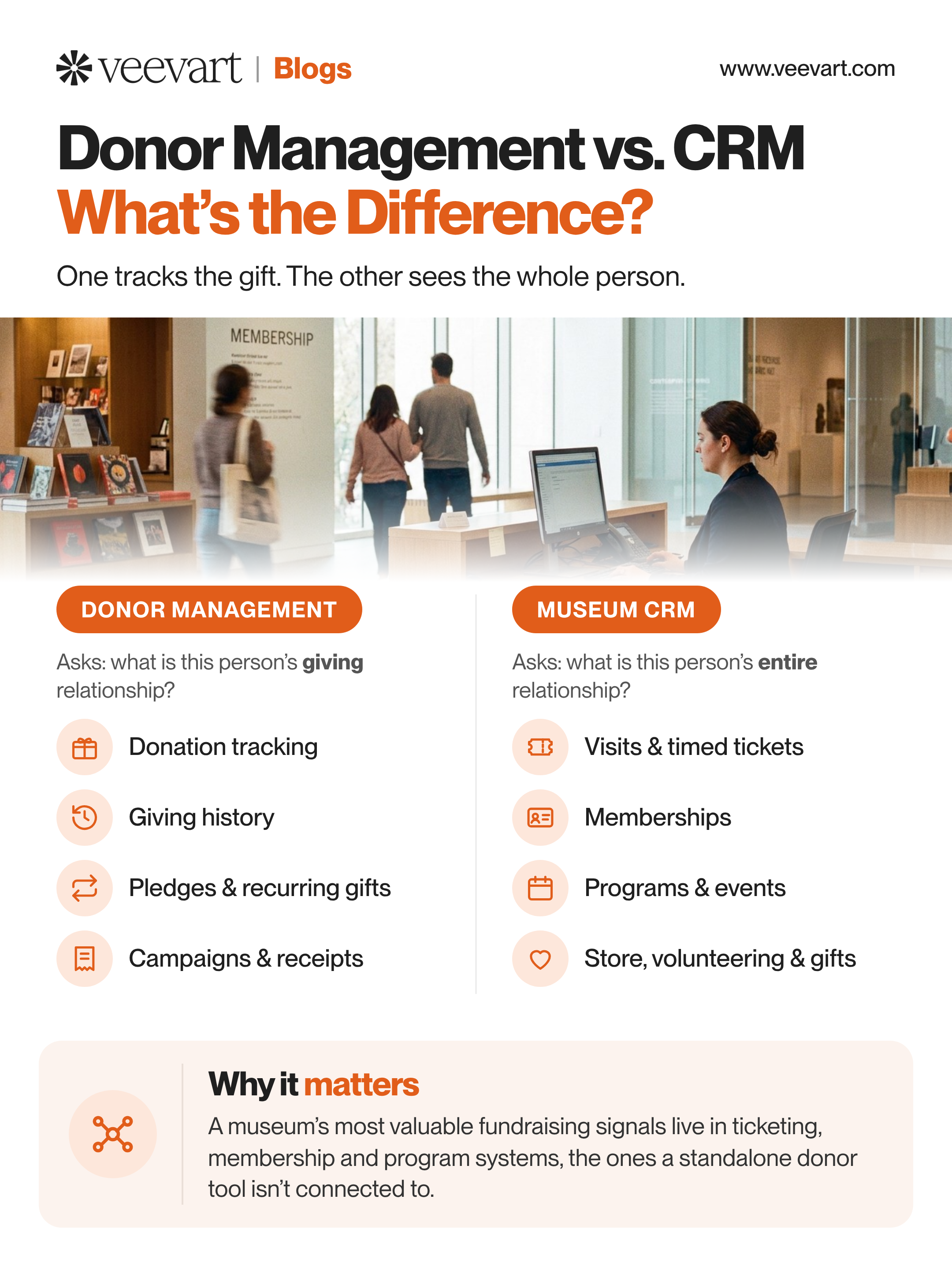
That's the key difference. A donor management system asks, "What is this person's giving relationship with us?" A CRM asks, "What is this person's entire relationship with us?"
For a museum, that distinction is significant, because a supporter's relationship with the institution is almost never only about giving. The same person might:
Visit with timed tickets several times a year
Hold a family membership
Attend lectures and programs
Shop in the gift store
Volunteer at events
And, somewhere in all of that, make donations
A donor management system sees the last item on that list. A full CRM sees all of them, connected to one constituent record. The donor, to a donor management system, is a giving history. The same donor, to a museum CRM, is a whole person whose giving is one part of a much larger relationship.
Why the Difference Matters for a Museum
Here's the practical consequence, and it's the heart of why this distinction isn't just semantics.
A museum's most valuable fundraising signals usually live outside of giving history. The visitor who comes eleven times a year and has never donated. The member whose engagement has climbed steadily and who is ready for a first major gift. The donor who attends every conservation program, telling you exactly what they care about. These are the signals that drive effective fundraising, and none of them are visible in giving data alone.
A donor management system in most cases and by design, can't see them. It knows what someone gave. It doesn't know they visit weekly, attend every program, and renew their membership early. All because that information lives in the ticketing, membership, and program systems the donor tool isn't connected to. (For how this reshapes fundraising specifically, see How Ticketing Data Can Drive Museum Fundraising.)
This is the catch with running donor management in isolation. It does the fundraising job competently, but it does it half-blind. The richest indicators of donor readiness are engagement signals it never sees. The development team ends up making cultivation decisions on giving history alone, when the fuller picture was available all along in systems that simply weren't connected.

Which One Does Your Museum Need?
The honest answer depends on the institution. So here's a straightforward way to think about it.
A standalone donor management system can be the right choice if fundraising is a largely self-contained function at your museum. If your donor relationships don't overlap much with visitation and membership, and you're comfortable managing those connections manually than it might fit. For some organizations, that's a reasonable alternative.
For most museums, though, the donor is also a visitor, a member, and a program attendee. The fundraising improves dramatically when the development team can see all of that in one place.That's the case for a full CRM rather than a standalone donor tool. It's not that donor management is inadequate, but that at a museum, donor relationships are closely connected to every other relationship the institution maintains. (For the complete picture of what a museum CRM covers, see [LINK: The Complete Guide to CRM for Museums and Cultural Institutions].)
The clearest way to decide is to look beyond giving alone. Consider how much you can learn from the other ways donors engage with your institution. For most museums, this points toward a CRM that takes a broader view of each donor. Donor management is an important part of that system, but it shouldn't be the only focus.
The Synopsis
A donor management system is a focused tool for tracking donors, gifts, and fundraising. A CRM is a broader system for managing the full relationship with every constituent, of which giving is one part. Donor management systems are sometimes called donor CRMs, which can make the distinction confusing. The real difference comes down to scope. Does the tool track only a donor's gifts, or does it capture their broader relationship with the institution?
For museums, donors are often also visitors, members, and event attendees. Understanding these connections shifts fundraising from simply tracking giving history to building a deeper understanding of each supporter. That's the difference between the two categories, and it's worth being clear on before you choose.
Veevart brings donor management into one platform with ticketing, membership, and programs, so your development team works from the donor's whole relationship with the museum, not just their giving history.
Frequently Asked Questions
What is a museum CRM?
A museum CRM is a customer relationship management system designed specifically for cultural institutions. Unlike a generic CRM built for sales, a museum CRM unifies ticketing, membership, fundraising, retail, rentals, camps, program registration, and often collections management into a single platform with one connected profile for every visitor, member, and donor. It functions as the institution's system of record for every relationship and interaction.
What's the difference between a CRM and a ticketing system?
A ticketing system handles one function: selling and managing admissions. A CRM is broader. It connects ticketing to membership, donations, retail, and programs so that a ticket purchase becomes part of a complete picture of who someone is to the institution. A standalone ticketing system records that a transaction happened. A CRM records who made it, what else they've done, and what the relationship looks like over time. In a true museum CRM, ticketing is one capability within the larger system rather than a separate tool.
How much does a museum CRM cost?
Pricing varies by platform and institution size, but museum CRMs are typically priced as an annual subscription, often on a per-user basis. Purpose-built museum platforms generally fall into a mid-range bracket: more than a barebones donor database, but less than the high total cost of legacy enterprise systems. When comparing costs, account for the full picture: implementation, data migration, training, and any third-party integrations a generic tool would require to match a purpose-built one. A low per-seat price that needs several add-on tools to function is rarely the bargain it appears to be. Many museums that qualify as nonprofits can also access discounted or donated licensing on the underlying platform, which lowers the effective cost.
Can a small museum afford a CRM?
Yes, and small institutions often have the most to gain. A small museum without dedicated IT staff benefits most from a system that works out of the box and replaces several disconnected tools. Nonprofit licensing programs on platforms like Salesforce provide free user licenses up to a certain number of seats, which keeps entry costs manageable. The relevant question for a small museum is not whether it can afford a CRM. It is whether it can afford the staff hours and lost intelligence that fragmentation costs.
How long does it take to implement a museum CRM?
Implementation typically takes several weeks to a few months, depending on the institution's size, the complexity of its data, and how many systems are being consolidated. The technical work, configuration and data migration, is only part of it. The more important variable is adoption: how fully the team transitions to the new system. A guided implementation with a dedicated expert shortens the timeline and significantly improves the odds of success. (See The Museum Change Management Playbook for how to manage the transition.)
What's the difference between a museum CRM and Blackbaud or generic Salesforce?
Legacy systems like Blackbaud Altru are purpose-built for cultural institutions but are often criticized for high cost, dated interfaces, and limited flexibility. Generic Salesforce is powerful and flexible, but it is not museum-specific out of the box. It requires significant customization or third-party apps to handle ticketing, membership, and retail. A museum-native CRM built on a modern platform aims to combine the strengths of both: the museum-specific functionality of a vertical system with the flexibility, security, and scalability of an enterprise platform, without the legacy drawbacks.
Do we need collections management in our CRM?
It depends on your institution. Collecting institutions, such as art, history, and science museums with objects to catalogue, benefit significantly from having collections management in the same system as constituent data, so engagement and collections can be understood together. Non-collecting institutions like children's museums or science centers may not need it. The advantage of a platform that offers it is the option to unify that data if and when you need to, rather than running a separate collections system in parallel.
How do we know if our current system is holding us back?
Common signs include: staff spending hours each week reconciling data between systems, reports that take days to assemble and still come with caveats, membership and donor data that live in separate places, an inability to answer basic questions about visitor behavior without a manual project, and workarounds that only specific staff members know how to perform. If any of these sound familiar, the cost of the status quo may already exceed the cost of consolidating. (See Five Signs Your Museum Has Outgrown Its Current CRM for a fuller diagnostic.)